YouTube Music on the desktop, lyrics on time.

Media keys, synced lyrics, a 10-band equalizer, Discord status, Listen Together and a phone remote, in a 7 MB app for Linux and Windows.

Latest: v0.4.1

Free and open source under GPL-3.0. Unofficial, not affiliated with Google or YouTube.

7.4 MB
Linux .deb
16 MB
the whole binary
~530 ms
launch to window
357 MB
memory at idle, every process

Release build on Linux (WebKitGTK), measured without YouTube Music loaded: the page adds its own memory on top. Windows has not been measured yet.

A look inside

From a full-window player to a small companion on your desktop. Open any screenshot for a closer look.

  1. 01Cinema and ambient modeGive the artwork room, with the current cover's colors behind the player.
  2. 02Mini playerKeep the current track and playback controls close while you work.
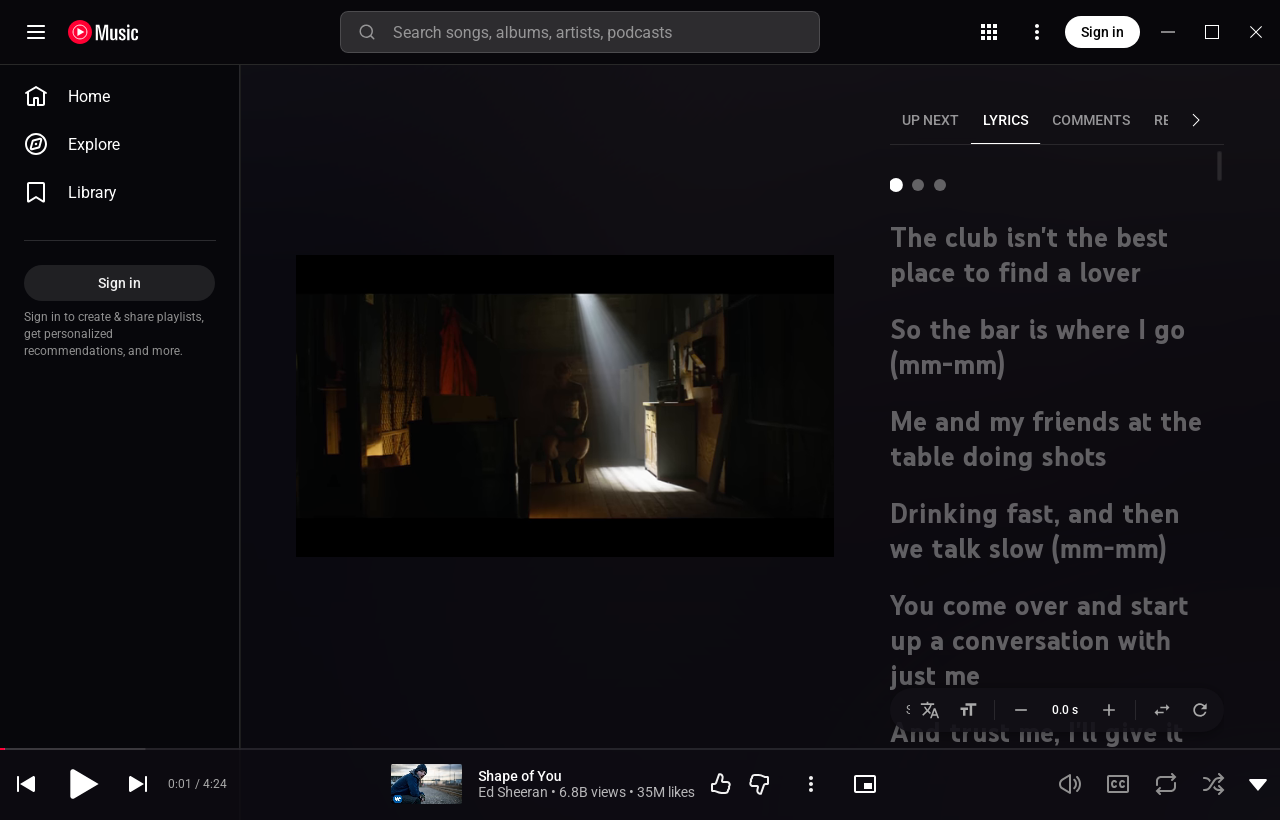
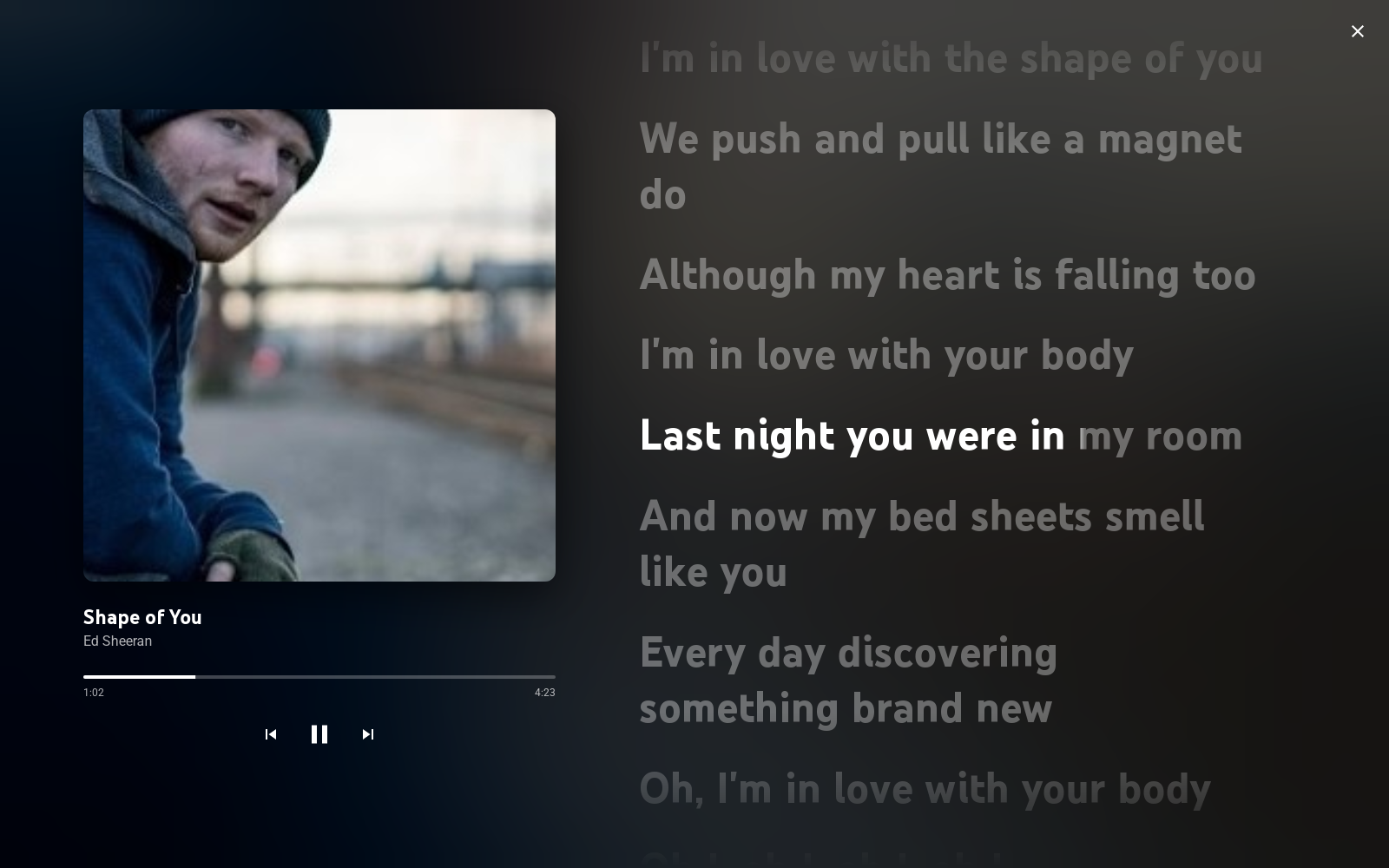
  3. 03Player and lyricsThe track, its artwork and lyrics in the same window.
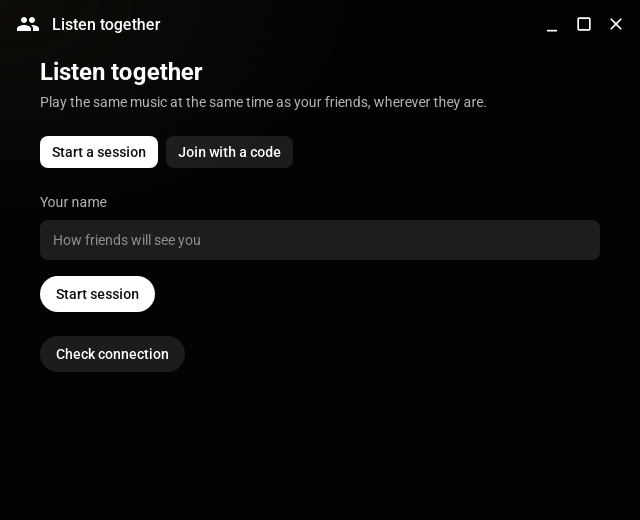
  4. 04Listen TogetherStart a session or join friends with a session code.
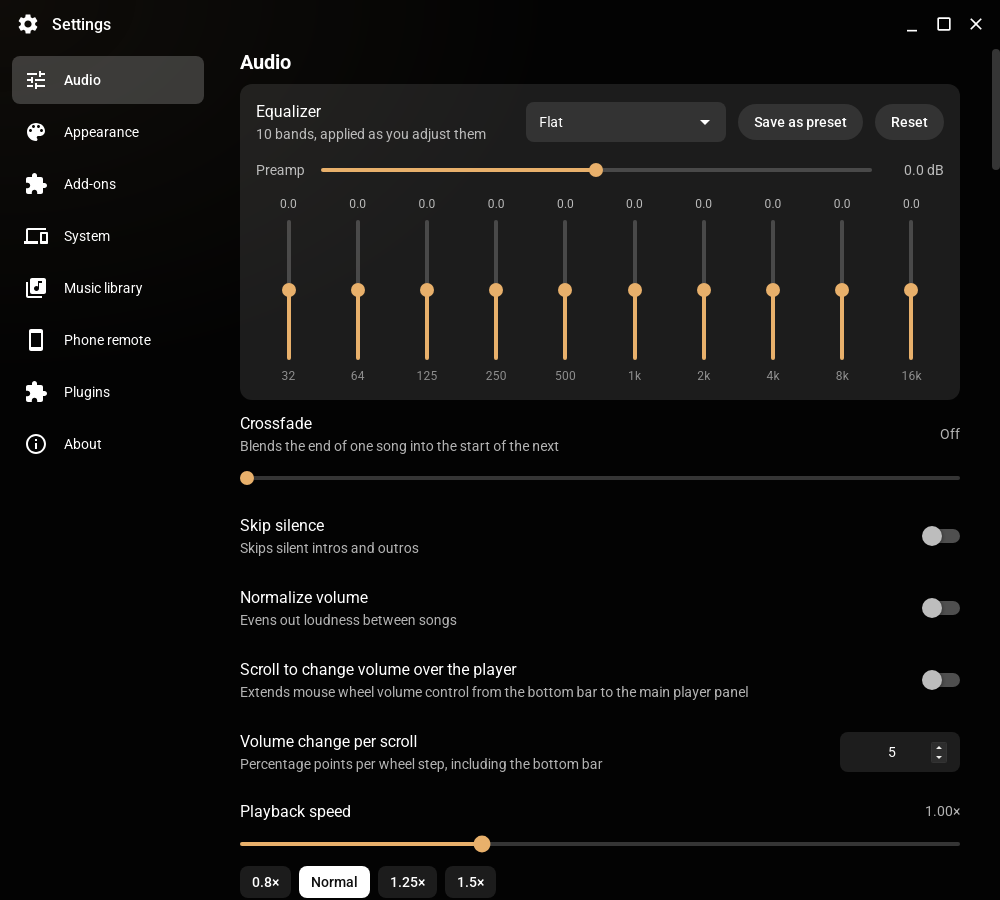
  5. 05Sound settingsAdjust the equalizer and playback to suit your setup.
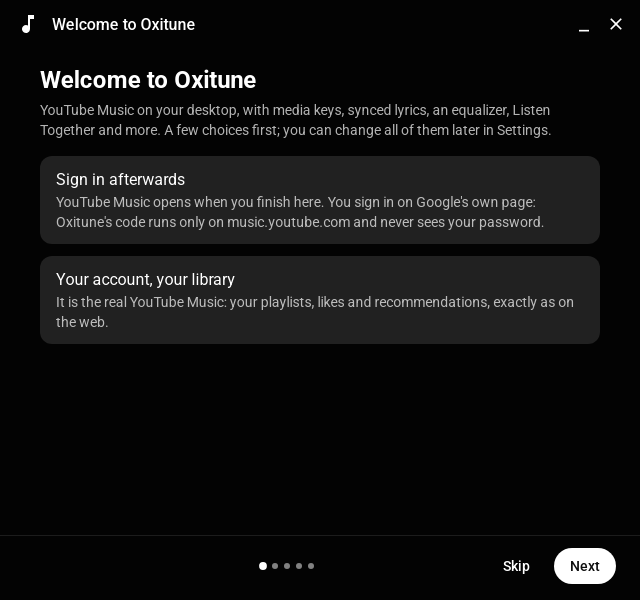
  6. 06First launchA short welcome before you settle in.
Oxitune player with cinema mode and ambient artwork colors enabled
Give the artwork room, with the current cover's colors behind the player.

Why Oxitune

The real YouTube Music

Oxitune opens music.youtube.com itself, signed in to your own account, and builds around it. Nothing is reimplemented or scraped, so your library and recommendations are exactly what you get on the web.

A player that belongs on a desktop

Media keys and the system's media controls, a tray menu, global shortcuts, a mini player that stays on top, notifications, no sleep while playing.

Sound you can shape

A 10-band equalizer with presets, preamp, loudness normalization, crossfade, silence skipping and speed with the pitch kept.

Lyrics that keep time

Synced, word by word where the source has it, from eight providers, in YouTube Music's Lyrics tab, the mini player and a fullscreen view.

Music together

Listen Together keeps friends on the same song at the same moment, on your network or over the internet, end-to-end encrypted.

Small and locked down

A Tauri app in Rust. The YouTube Music page can reach two narrow, validated commands and nothing else, and every update is signed.

Yours to extend

A versioned plugin API with a closed set of permissions and signed registries. Oxitune's own features are plugins on that same API.

Features

Audio

Equalizer
10 bands from 32 Hz to 16 kHz, presets and your own, preamp from −24 to +24 dB
Loudness
Normalization so quiet and loud tracks sit together
Transitions
Crossfade up to 12 s, skip silence at the start and end of songs
Speed
0.5× to 2×, optionally keeping the pitch

Desktop

Media controls
MPRIS on Linux, SMTC and taskbar preview buttons on Windows
Discord
Rich Presence with the current song and an optional Listen along button
Everyday
Tray menu, global shortcuts, notifications, scroll-wheel volume
Behaviour
No sleep while playing, pause on screen lock, resume the last song, optional autostart
First launch
A short welcome that sets up the essentials and says what goes online

Lyrics

Sources
Local .lrc files and tags, lrc.red, LRCLIB, YouTube Music, Genius; Unison, Musixmatch and NetEase optional
Display
Word-by-word highlighting, duet voices, background vocals, six looks, a fullscreen view
Control
Per-song timing offsets, a wrong lyrics picker, seek by clicking a line
Languages
Optional translation and romanization through Google Translate, off by default

Together

Listen Together
Same song, same moment, over your network or public MQTT brokers
Roles
Host, moderator, DJ and listener, join approval, vote to skip, reactions, a shared queue
Phone remote
Playback, volume, queue and search from a phone's browser, paired by QR code; off by default

Library

Local files
MP3, FLAC, M4A, OGG, Opus and WAV from your music folder, in their own window
Mini player
Always on top, with cover art and lyrics

Look

Ambient lighting
A soft wash of the current cover behind the page, its color as the accent
Custom CSS
Your own styles over YouTube Music

Data

One folder
Everything in ~/.oxitune/, owner-only, with rotated logs
Backup
Export every setting to one file and import it elsewhere
Languages
English and Polish, following the system or YouTube Music

Download

Linux and Windows, 64-bit. Pick the file for your system.

v0.4.1, released 2026-11-11Release notes ↗

After downloading

Linux

  1. Debian, Ubuntu, Mint:sudo apt install ./Oxitune_*.deb
  2. Fedora, openSUSE:sudo dnf install ./Oxitune-*.rpm
  3. AppImage: make it executable and run it. If it does not start on Ubuntu 22.04 or newer, install FUSE 2 (libfuse2t64 on 24.04).chmod +x Oxitune_*.AppImage && ./Oxitune_*.AppImage
  4. Sign in to YouTube Music in the window that opens; a short welcome sets up the rest.

Windows

  1. Open the setup file from your Downloads folder.
  2. If Windows says it protected your PC, click More info, then Run anyway. The installer is not code-signed yet; the app inside checks every update against its own signing key.
  3. Oxitune installs for your user only, without administrator rights, and opens. Sign in to YouTube Music; a short welcome sets up the rest.

The AppImage and both Windows installers update themselves: Oxitune checks in the background, offers the new version and verifies it against the signing key built into the app. .deb and .rpm installs update by installing the new package.

All releases ↗

Build it yourself

$ gh repo clone 7moons/Oxitune
$ cd Oxitune && bun install
$ bun run tauri build

Build requirements ↗

Plugins

All official, from the registry built into Oxitune. Pick one to see what it changes, what it asks for in the words the app uses, and what you can set.

Ad blocker ↗

app.oxitune.adblock

Removes ad scheduling from YouTube Music's responses and mutes, hides and skips what slips through.

Asks for

  • See what's playingplayer:read
  • Read and change the YouTube Music pagepage
  • Show messages and restyle YouTube Musicui

You can set

Nothing; it works as soon as it is on.

SponsorBlock ↗

app.oxitune.sponsorblock

Skips intros, outros and other non-music parts of music videos, using the SponsorBlock database.

Asks for

  • See what's playingplayer:read
  • Control playbackplayer:control
  • Connect to the internet (only the sites listed)network

You can set

Skip non-music parts
on by default
Skip intros
on by default
Skip outros
on by default
Skip sponsor segments
on by default
Skip self-promotion
on by default

Downloader ↗

app.oxitune.downloader

A player-bar button that saves the current song with yt-dlp, which Oxitune can install for you.

Asks for

  • See what's playingplayer:read
  • Read and change the YouTube Music pagepage
  • Show messages and restyle YouTube Musicui
  • Save songs to your folder for saved songs (with yt-dlp)media:save

You can set

Format
MP3 with the cover art, M4A, Opus or FLAC; MP3 by default

Alternative appearance ↗

app.oxitune.appearance

Two new looks for YouTube Music: translucent glass over the blurred cover art with a floating player bar, or rounded panels on black.

Asks for

  • See what's playingplayer:read
  • Read and change the YouTube Music pagepage
  • Show messages and restyle YouTube Musicui

You can set

Look
Glass or Panels; Glass by default
Font
Geist by default, or Inter, Figtree, Manrope, Plus Jakarta Sans, DM Sans, Roboto
Take colors from the cover
on by default; off gives the look a fixed accent
Floating player bar
Glass only, on by default
Corner roundness
0 to 28 px, 12 by default
Cover backdrop strength
Glass only, 0 to 100 %, 70 by default

Example theme ↗

app.oxitune.example-theme

The smallest useful plugin: tints the progress bar and buttons with an accent you pick. Start here.

Asks for

  • Show messages and restyle YouTube Musicui

You can set

Accent color
YouTube red, Teal or Gold; red by default
Official registry
Built in. Its index must be signed with the registry key built into Oxitune.
Registries you add
Settings, Plugins, Registries, each with that registry's own public key.
A folder on disk
Developer mode only, with a warning.

Registry on GitHub ↗ Write a plugin ↗

Oxitune or a browser tab

5things a browser tab cannot do

  • Own window, tray and global shortcuts
  • Always-on-top mini player with lyrics
  • Listening together in sync, end-to-end encrypted
  • Phone remote over Wi-Fi
  • Local music files in the same app

Where a tab gets close, and the catch

Synced lyrics from several providers, word by word
In a tab: some songs
10-band equalizer, crossfade, skip silence
In a tab: extension
Discord Rich Presence
In a tab: extension
Signed plugins with declared permissions
In a tab: extensions, broad permissions

The same in both: your library, playlists and recommendations; media keys and system media controls.

A browser tab is the lighter choice if you only ever play music in the background. Oxitune is for when YouTube Music is your music player.

Security

Found a vulnerability? Report it privately, not in a public issue.

The page is fenced in
music.youtube.com runs with two commands: a validated bridge for player state, lyrics, Listen Together and the remote. No files, no settings, no updater, no shell.
Navigation is pinned
The main window only goes to YouTube Music and Google sign-in; other links open in your browser. Every window has a Content Security Policy without unsafe-eval.
Listen Together
A session code carries 130 random bits. Every message is encrypted with AES-256-GCM and signed with the sender's Ed25519 key. Brokers see an opaque topic id, never the code, the songs or the people.
Phone remote
Off by default. Listens on this PC's LAN address only, pairs through a token in the QR code, checks Host and Origin and offers nothing but playback control.
Updates and builds
Updates are signed with minisign. Releases are built by GitHub Actions with pinned actions and dependency checks on every push.

Limits

Linux and Windows only
There is no macOS build.
It is the YouTube Music website
When YouTube changes its page, a feature that reads it can break until Oxitune catches up. You need a YouTube Music account, and Premium for what Premium gives on the web.
Listen Together's code is the secret
Anyone with it can read along and ask to join, so turn on join approval for codes shared widely.
Linux rendering
Oxitune turns off WebKitGTK's DMA-BUF renderer, which made windows flicker on older GPUs. WEBKIT_DISABLE_DMABUF_RENDERER=0 turns it back on.

Questions

Is Oxitune free?

Yes. It is free and open source under GPL-3.0. The only account involved is your own YouTube Music one. Source on GitHub ↗

Do I need YouTube Music Premium?

No. You get what your account gets on music.youtube.com: Premium features such as listening without ads work in Oxitune as they do on the web, and a free account works like a free account.

Is it safe for my Google account?

Oxitune shows the official music.youtube.com page, signed in the normal way, and contains no code that touches streams or their protection. Optional plugins such as the ad blocker or the downloader are your choice, under YouTube's Terms of Service.

Is there a macOS version?

No. Oxitune runs on Linux and Windows.

How does it update?

The AppImage and both Windows installers check in the background, offer the new version and verify its signature before installing. With the .deb or .rpm, install the new package over the old one. All releases ↗

Where are my settings and data?

Everything is in ~/.oxitune/, readable only by your user, with rotated logs. Every setting can be exported to one file and imported on another computer.

What goes online?

YouTube Music itself, the lyrics providers you keep on, and update checks. Listen Together, the phone remote and translation are off until you turn them on. The welcome on first launch lists all of it.

Who can see what I play with Listen Together?

The people with the session code. Messages are end-to-end encrypted, so the brokers in between see an opaque topic id, not the code, the songs or the people. Turn on join approval when you share a code widely.

Can I write my own plugin?

Yes. Plugins are plain JavaScript with a manifest that declares their permissions. Start from the example theme in the registry. Plugin API ↗

Something broke. Where do I report it?

Open an issue with the logs from Settings, System, Open logs folder, and the song or page where it happened. Security problems go to a private advisory instead. Open an issue ↗